# Installation Guide Preamble
Welcome to our guide. This document is intended for BarTrack customers as well as their POS technicians. It specifies setup instructions for on-boarding a new customer with an existing POS integration we support. Please use the URL to this guide, it is always being updated.
## About Integrations
The BarTrack system will work without point-of-sale integration, but in order to take full advantage of BarTrack, we have to build ways to collect reports and configuration data from the point-of-sale software. Integrating the POS allows us to check pour data against what was actually input into the POS, which provides our reporting with its pour vs sales analytics. This guide contains everything you need to know before setup of a BarTrack POS integration. It should answer most of the questions and any concerns you may have about the process, as well as provide your POS support tech with the details of our needs in the event we don’t have access to complete the setup.
## Collected Data
We export and use the following pieces of information from POS reports for each **Item**:
- Order ID
- Location ID (identification of terminal or handheld, or employee ID/name)
- Timestamp sold
- Name
- Price
- Tax
- Modifiers
- name, tax, price, quantity
- Quantity
- Category (Report Group)
- Subcategory
- Adjusted price or discounted amount
- Void
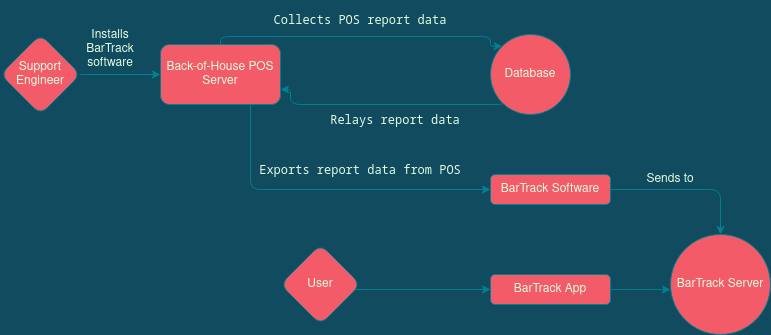
### Cloud
Cloud integrations always have a some form of reporting online, usually through a web portal.
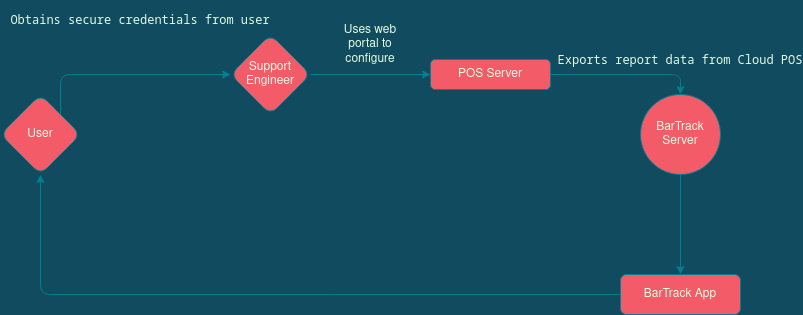
### Omnivore
Omnivore is a 3rd party data provider that makes local data cloud-based for some local/legacy systems. It requires Windows 7 or higher and supports the following POS systems:
- Aloha TS, Aloha QS 12.3+
- ReadOnly Licensing: None required for previous days' data. Aloha Connect required for real-time.
- Brink
- Dinerware 3.3+
- Lightspeed L-Series
- Maitre'D 7.05.95+
- Currently only closed tickets reads are supported.
- Micros 3700 5.x
- Micros Simphony FE 1.6+
- Micros Simphony 2.9+, 18.x
- ReadOnly Licensing: Transaction Services License required.
- NCR Cloud Connect
- POSitouch 5.36+, 6.36+, QuickMenu 2.6.7.12+
- EMV payments not supported using MidniteExpress.
- Squirrel 8.x+ for reads, 10.2+ for writes, 11.x+
- XPIENT 3.x+
Further details can be found here upon logging in to the Omnivore portal:
[https://panel.omnivore.io/docs/guides/features/compatibility](https://panel.omnivore.io/docs/guides/features/compatibility)
## General Requirements
### Local Integrations
This integration type requires the BarTrack software to be installed on the POS server. Some anti-virus and/or firewalls may need to be set up to allow the service to run in the background. Please allow a BarTrack support engineer access to the server for initial assessment.
Download our remote access software to get started.
[Click Here to Download](https://support.bartrack.beer)
Windows username/password with **Administration** security level (we prefer having an account made for BarTrack).
- Windows 10 create user, see:
- [https://support.microsoft.com/en-us/windows/create-a-local-user-or-administrator-account-in-windows-10-20de74e0-ac7f-3502-a866-32915af2a34d](https://support.microsoft.com/en-us/windows/create-a-local-user-or-administrator-account-in-windows-10-20de74e0-ac7f-3502-a866-32915af2a34d)
- Windows 7 & 8 create user, see:
- [https://support.microsoft.com/en-us/windows/create-a-user-account-in-windows-4fac6fd5-74c0-9737-69b8-6e77e00422dc](https://support.microsoft.com/en-us/windows/create-a-user-account-in-windows-4fac6fd5-74c0-9737-69b8-6e77e00422dc)
### Cloud Integrations
Cloud integrations may have one of the following types of authorization credentials.
- Online portal username & password.
- Often you’ll invite/add our user by email address to provide access to the portal so that we won’t need your personal or admin username/password. We need read-only/view-only access to reports. We do not need access to other parts of the system, but if your software only offers admin without restrictions/roles then that will work. Please see the specific integration to determine which email address you should invite.
- API key and/or token
### Omnivore Integrations
### Best Practices
- Open Items - **NOT SUPPORTED**. Those items that ask for a price can only be used in the following instances:
- If the open beer SKU represents a static volume, a dynamic beverage, and a dynamic price, it can be treated under general sales.
- However, If it’s a dynamic volume, dynamic beverage, dynamic price it cannot be captured by BarTrack reports.
- Adding Items - Make sure all items are entered in the system properly before ordering.
- Avoid adjusting pricing on the fly. Using zero-priced items like Open Items causes reporting inconsistencies.
- It’s recommended that you categorize your items correctly or they will show as Uncategorized.
## Caveats
- Open items are **NOT SUPPORTED** and will cause problems when using with beer items.
- Those items that ask for a price can only be used in the following instance:
If the open beer SKU represents a static volume, a dynamic beverage, and a dynamic price, it can be treated under general sales.
-
However, if it’s a dynamic volume, dynamic beverage, dynamic price it cannot be captured by BarTrack reports.
- Out-of-hours pours (e.g., when a monitored beverage is poured outside business hours)
- AM vs. PM Breakdown
- Pour vs. sale analysis -(keg breakdown - matching algorithm)
- Matching (including over-/under-pour)
- Sub-day reporting (the API already supports it, but we’re not delivering anything based on it yet)
- “Rotation” (where data from tomorrow is pulled into today for the purposes of reporting, e.g., midnight to 2AM)